Content Menu
● How To Clean Samsung Heat Pump Dryer
● Understanding Your Samsung Heat Pump Dryer
>> Key Components to Clean
● Step-by-Step Cleaning Process
>> Step 1: Gather Your Supplies
>> Step 2: Unplug the Dryer
>> Step 3: Clean the Lint Filter
>> Step 4: Clean the Heat Exchanger
>> Step 5: Wipe Down the Drum
>> Step 6: Check the Ventilation System
>> Step 7: Final Check
● Tips for Maintaining Your Samsung Heat Pump Dryer
● Conclusion
● Frequently Asked Questions
>> 1. How often should I clean my Samsung heat pump dryer?
>> 2. What tools do I need to clean my dryer?
>> 3. Can I use any detergent to clean the drum?
>> 4. What should I do if my dryer is not drying clothes properly?
>> 5. Is it safe to clean the dryer myself?
How To Clean Samsung Heat Pump Dryer
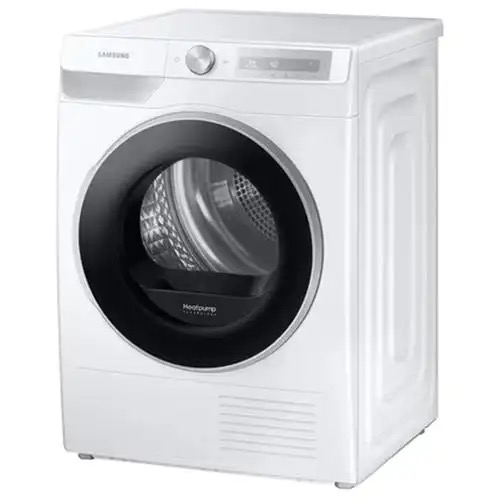
Cleaning your Samsung heat pump dryer is essential for maintaining its efficiency and prolonging its lifespan. Over time, lint and debris can accumulate in various parts of the dryer, leading to reduced performance and potential malfunctions. This guide will walk you through the steps to effectively clean your Samsung heat pump dryer, ensuring it operates at its best.
Understanding Your Samsung Heat Pump Dryer
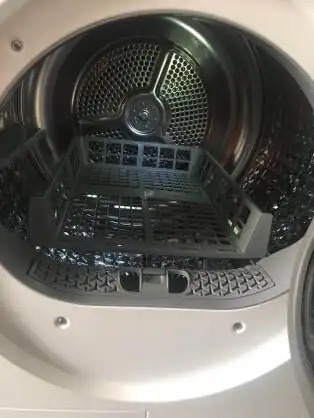
Before diving into the cleaning process, it's important to understand how a heat pump dryer works. Unlike traditional dryers that vent hot air outside, heat pump dryers recycle air within the machine. This makes them more energy-efficient but also means that they require regular maintenance to prevent lint buildup.
Key Components to Clean
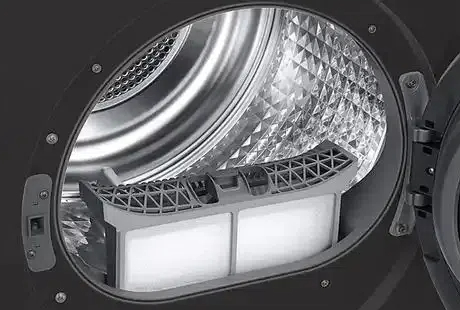
1. Lint Filter: This is the first line of defense against lint buildup. It should be cleaned after every load.
2. Heat Exchanger: This component is crucial for the dryer’s efficiency and needs to be cleaned periodically.
3. Drum: The interior of the drum should be wiped down to remove any residue or stains.
4. Ventilation System: Ensure that the ventilation system is clear of obstructions.
Step-by-Step Cleaning Process
Step 1: Gather Your Supplies
Before you start cleaning, gather the following supplies:
1. Soft cloths
2. A vacuum cleaner with a brush attachment
3. A cleaning brush (often provided with the dryer)
4. Mild detergent (if needed)
Step 2: Unplug the Dryer
Safety first! Always unplug your dryer before starting any cleaning process to avoid electrical hazards.
Step 3: Clean the Lint Filter
1. Remove the Lint Filter: Pull out the lint filter from its compartment.
2. Clean the Filter: Use your hands or a soft brush to remove lint. Rinse it under warm water if necessary, and let it dry completely before reinserting it.
Step 4: Clean the Heat Exchanger
1. Access the Heat Exchanger: Open the outer cover of the dryer. This usually involves pressing a latch or lever.
2. Remove the Inner Cover: Unlock the levers and take out the inner cover to expose the heat exchanger.
3. Brush the Heat Exchanger: Use the cleaning brush to gently remove any dust or lint from the heat exchanger fins. Be careful not to bend or damage the fins.
4. Reassemble: Once cleaned, reinsert the inner cover and lock it in place, then close the outer cover.
Step 5: Wipe Down the Drum
1. Use a Soft Cloth: Dampen a soft cloth with mild detergent and wipe down the interior of the drum.
2. Dry the Drum: Use a dry cloth to ensure no moisture remains.
Step 6: Check the Ventilation System
1. Inspect the Vent: Ensure that the ventilation system is clear of any obstructions. Use a vacuum cleaner to remove any lint buildup in the vent.
2. Clean the Vent: If necessary, detach the vent hose and clean it thoroughly.
Step 7: Final Check
After cleaning all components, double-check that everything is reassembled correctly. Plug the dryer back in and run a short cycle to ensure it operates smoothly.
Tips for Maintaining Your Samsung Heat Pump Dryer
1. Regular Cleaning: Make it a habit to clean the lint filter after every load and the heat exchanger every few months.
2. Monitor Performance: If you notice that your dryer is taking longer to dry clothes, it may be time for a thorough cleaning.
3. Professional Servicing: Consider having your dryer serviced by a professional if you encounter persistent issues.
Conclusion
Cleaning your Samsung heat pump dryer is a straightforward process that can significantly enhance its performance and longevity. By following these steps and maintaining a regular cleaning schedule, you can ensure that your dryer operates efficiently and effectively.
Frequently Asked Questions
1. How often should I clean my Samsung heat pump dryer?
It is recommended to clean the lint filter after every load and the heat exchanger every few months.
2. What tools do I need to clean my dryer?
You will need a soft cloth, a vacuum cleaner with a brush attachment, and a cleaning brush.
3. Can I use any detergent to clean the drum?
It is best to use a mild detergent to avoid damaging the drum's surface.
4. What should I do if my dryer is not drying clothes properly?
Check the lint filter and heat exchanger for clogs, and ensure the ventilation system is clear.
5. Is it safe to clean the dryer myself?
Yes, as long as you unplug the dryer and follow the cleaning instructions carefully.


